Q: I need to sign PDF documents with my USB Smart Card. Can I do that using Xodo PDF Studio on my Linux system?
A: Yes, you can. We allow users to sign a document using their USB Smart Card. You can see the setup below as a reference.
In this example, we used Safenet eToken 5100 on Ubuntu 18.04, different devices might have different setup.
Note: If you’re using different card, you will need to figure out what libraries are needed for your card and skip step 1 to step 3.
1. Plug the USB Smart Card/Token into your computer
2. Install the following 3 packages in order, you can either install the .deb files by double click to open software center or install from terminal:
a. https://getpdfstudio.xodo.com/xodopdfstudio/safenet/linux/libhal1_0.5.14-8_amd64.deb
b. https://getpdfstudio.xodo.com/xodopdfstudio/safenet/linux/libhal-storage1_0.5.14-8_amd64.deb
c. 64bit: https://getpdfstudio.xodo.com/xodopdfstudio/safenet/linux/SafenetAuthenticationClient-9.0.43-0_amd64.deb
32bit: https://getpdfstudio.xodo.com/xodopdfstudio/safenet/linux/SafenetAuthenticationClient-9.0.43-0_i386.deb
Install the DEB file associated with your platform (for example, I installed the 64bit version)
If the installation fails due to a lackof dependencies,enter the following:
The dependencies are installed and the installation continues
Note: if you’re using a newer version of Safenet Authentication Client (10.4), the library name has been changed to “libIDPrimePKCS11.so”
3. Go to home/usr/lib and verify that “libeTPkcs11.so” displays
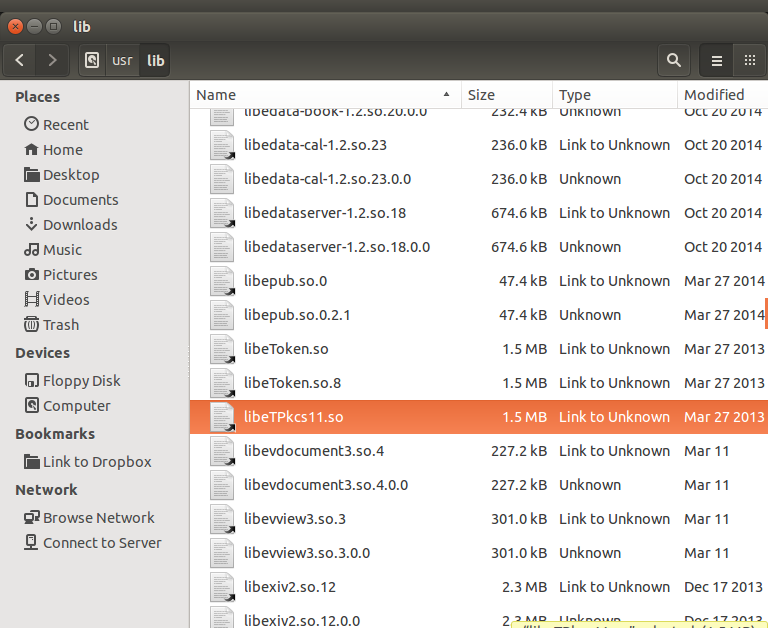
4. Create a configuration file, see the example as below and save it with the name “config.cfg”:
5. Open Xodo PDF Studio, go to Edit -> Preferences -> Digital IDs.
6. Click “Browse” button under “Additional IDs” section
7. Browse the “config.cfg” which we created in step4.
8. Input the password on your smart card/token.
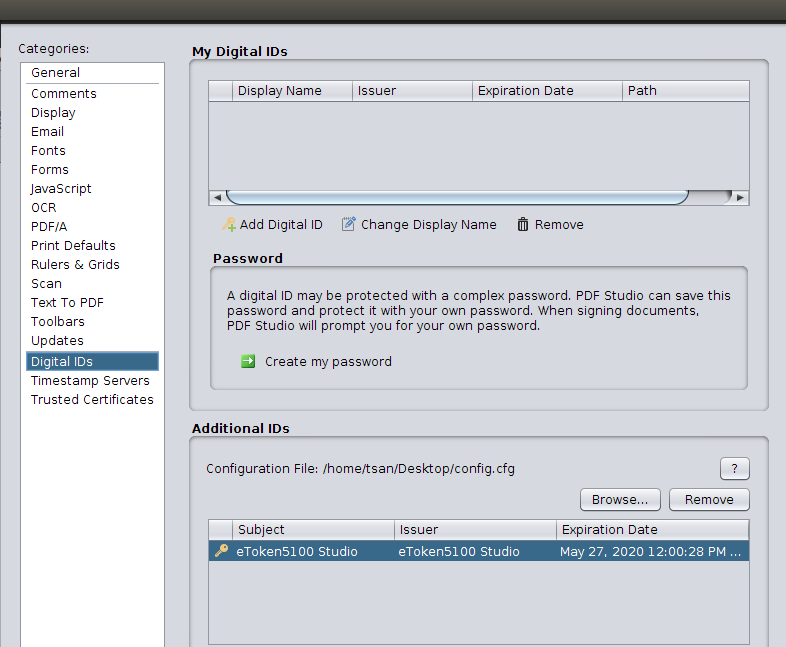
From now on, the signature ID on your smart card should displays on the signature list and allow you to sign the document.

Hardware info:
SafeNet eToken 5100 – USB security key
Purchase links from CDW
https://www.cdw.com/shop/products/SafeNet-eToken-5100-USB-security-key/3763337.aspx
Previously discontinued USB Key:
https://www.cdw.com/shop/products/SafeNet-eToken-5100-USB-security-key/2604743.aspx)
Was this article helpful?
That’s Great!
Thank you for your feedback
Sorry! We couldn't be helpful
Thank you for your feedback
Feedback sent
We appreciate your effort and will try to fix the article